Wednesday, October 17, 2018

What are the Types of Cables?


CONNECTING DEVICES

Cable
          -it is a medium that connects computer in a network. Alternatively referred to as a cordconnector or plug, a cable is one or more wires covered in a plastic covering that allows for the transmission of power or data between devices. The picture is an example of what the power cord may look like for your computer or monitor. The power cord is just one example of thousands of other cables found in and around computers.

Types of Cables


1. Twisted-pair cable- the use of two wires twisted together helps to reduce crosstalk and electromagnetic induction. While twisted-pair cable is used by older telephone networks and is the least expensive type of local-area network (LAN) cable, most networks contain some twisted-pair cabling at some point along the network.


Image result for twisted pair cables


          a. Shielded twisted pair (STP) cable- was originally designed by IBM for token ring networks that include two individual wires covered with a foil shielding, which prevents electromagnetic interference, thereby transporting data faster. 


     b. Unshielded twisted pair (UTPcablesare widely used in the computer and telecommunications industry as Ethernet cables and telephone wires. In an UTP cable, conductors which form a single circuit aretwisted around each other in order to cancel out electromagnetic interference (EMI) from external sources.

2. Coaxial cableis a type of electrical cable that has an inner conductor surrounded by a tubular insulating layer, surrounded by a tubular conducting shield. Many coaxial cables also have an insulating outer sheath or jacket.

Image result for coaxial cable


3. Fiber-optic cableis an assembly similar to an electrical cable, but containing one or more optical fibers that are used to carry light. The optical fiber elements are typically individually coated with plastic layers and contained in a protective tube suitable for the environment where the cable will be deployed.


Image result for Fiber-optic cable-


           Straight-through is the most common type and is used to connect computers to hubs or switches. They are most likely what you will find when you go to your local computer store and buy a patch cable.


           Crossoveris more commonly used to connect a computer to a computer and may be a little harder to find since they aren’t used nearly as much as straight through cable.

Wednesday, August 22, 2018

What are the Types of Network Topology?

Types of Network Topology


Network Topology is the schematic description of a network arrangement, connecting various nodes(sender and receiver) through lines of connection. It is the arrangement of the elements of a communication network. Network topology is the topological structure of a network and may be depicted physically or logically.

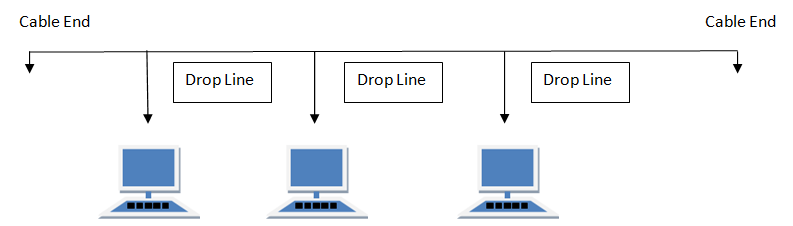
BUS Topology

Bus topology is a network type in which every computer and network device is connected to single cable. When it has exactly two endpoints, then it is called Linear Bus topology.
Bus topology in computer networks

RING Topology

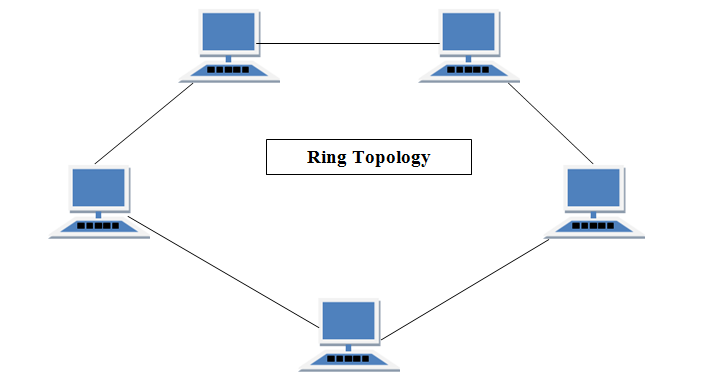
It is called ring topology because it forms a ring as each computer is connected to another computer, with the last one connected to the first. Exactly two neighbors for each device.
Ring topology in computer networks

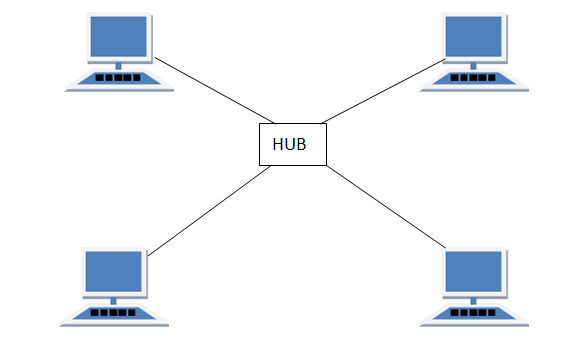
STAR Topology

In this type of topology all the computers are connected to a single hub through a cable. This hub is the central node and all others nodes are connected to the central node.
Star topology in computer networks

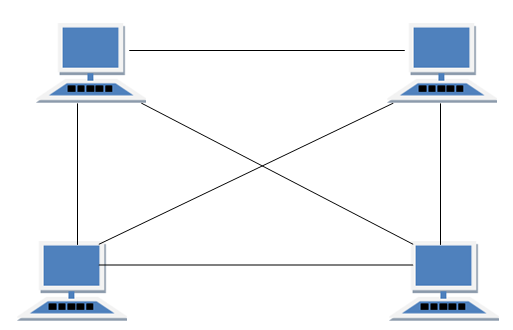
MESH Topology

It is a point-to-point connection to other nodes or devices. Mesh networks dynamically self-organize and self-configure, which can reduce installation overhead. The ability to self-configure enables dynamic distribution of workloads, particularly in the event that a few nodes should fail. This in turn contributes to fault-tolerance and reduced maintenance costs.
Mesh topology in computer networks

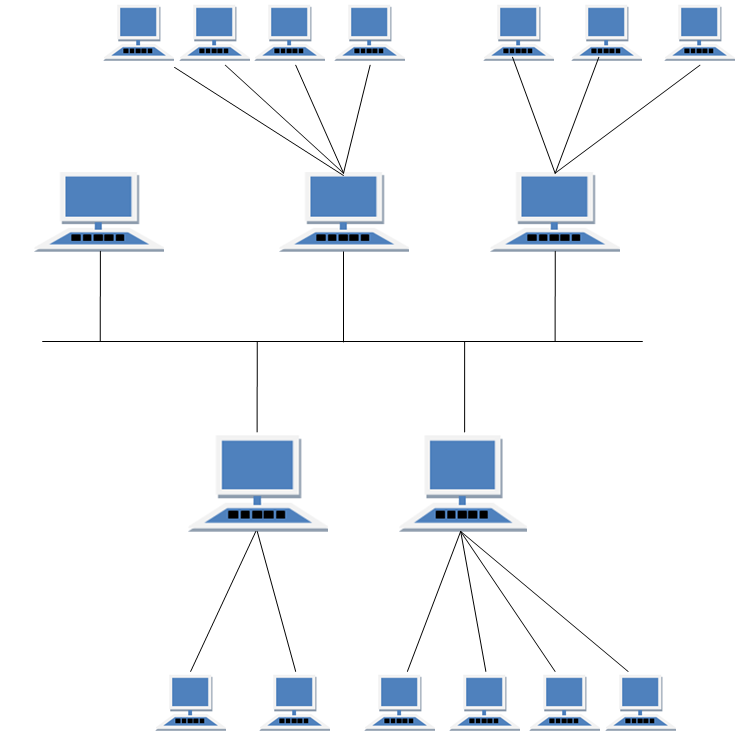
HYBRID Topology

It is two different types of topologies which is a mixture of two or more topologies. For example if in an office in one department ring topology is used and in another star topology is used, connecting these topologies will result in Hybrid Topology (ring topology and star topology).
Hybrid topology in computer networks
Source: https://www.studytonight.com/computer-networks/network-topology-types

Wednesday, August 1, 2018

What are the Types of Computer Network?


Types of Networks

There are several different types of computer networks. Computer networks can be characterized by their size as well as their purpose.


The size of a network can be expressed by the geographic area they occupy and the number of computers that are part of the network. Networks can cover anything from a handful of devices within a single room to millions of devices spread across the entire globe.
Some of the different networks based on size are:
  • Personal area network, or PAN
  • Local area network, or LAN
  • Metropolitan area network, or MAN
  • Wide area network, or WAN

Personal Area Network

personal area network, or PAN, is a computer network organized around an individual person within a single building. This could be inside a small office or residence. A typical PAN would include one or more computers, telephones, peripheral devices, video game consoles and other personal entertainment devices.
If multiple individuals use the same network within a residence, the network is sometimes referred to as a home area network, or HAN. In a very typical setup, a residence will have a single wired Internet connection connected to a modem. This modem then provides both wired and wireless connections for multiple devices. The network is typically managed from a single computer but can be accessed from any device.
This type of network provides great flexibility. For example, it allows you to:
  • Send a document to the printer in the office upstairs while you are sitting on the couch with your laptop.
  • Upload a photo from your cell phone to your desktop computer.
  • Watch movies from an online streaming service to your TV.
If this sounds familiar to you, you likely have a PAN in your house without having called it by its name.

Local Area Network


local area network, or LAN, consists of a computer network at a single site, typically an individual office building. A LAN is very useful for sharing resources, such as data storage and printers. LANs can be built with relatively inexpensive hardware, such as hubs, network adapters and Ethernet cables.
The smallest LAN may only use two computers, while larger LANs can accommodate thousands of computers. A LAN typically relies mostly on wired connections for increased speed and security, but wireless connections can also be part of a LAN. High speed and relatively low cost are the defining characteristics of LANs.
LANs are typically used for single sites where people need to share resources among themselves but not with the rest of the outside world. Think of an office building where everybody should be able to access files on a central server or be able to print a document to one or more central printers. Those tasks should be easy for everybody working in the same office, but you would not want somebody just walking outside to be able to send a document to the printer from their cell phone! If a local area network, or LAN, is entirely wireless, it is referred to as a wireless local area network, or WLAN.

Metropolitan Area Network

metropolitan area network, or MAN, consists of a computer network across an entire city, college campus or small region. A MAN is larger than a LAN, which is typically limited to a single building or site. Depending on the configuration, this type of network can cover an area from several miles to tens of miles. A MAN is often used to connect several LANs together to form a bigger network. When this type of network is specifically designed for a college campus, it is sometimes referred to as a campus area network, or CAN.

Wide Area Network

wide area network, or WAN, occupies a very large area, such as an entire country or the entire world. A WAN can contain multiple smaller networks, such as LANs or MANs. The Internet is the best-known example of a public WAN.


"Networking is all about connecting with people. But then again, isn't that what life is about? The more time you can find to get out of the office and build true friendships, the farther your startup will go. Entrepreneurs need to remember to spend as much time working on their business as they do in their business."


                                                                                                                              -Jay Samit


Source: https://study.com/academy/lesson/types-of-networks-lan-wan-wlan-man-san-pan-epn-vpn.html

Tuesday, July 3, 2018

How to be a Responsible Netizen?


          People in our present time are exposed in today's digital world. Internet and online connectivity became so important in our daily lives. We can't deny the fact that this today's technology is fast spreading worldwide and is so useful to all of us. But how do you behave behind these newly communication devices?

          In our country, which is the Philippines, we have the freedom to express what we feel and we are allowed to state our own opinions towards other people. It is sometimes easy to forget that on the net, we are not just talking to the computers nor to mobile devices. We often forget that we are communicating with real people, people who have feelings like us.

         Cyber bullying and social harassment are usually happening nowadays. People are so brave of throwing rude judgments to other people that doesn't involve face-to-face interaction. They always tell harsh things to others but they don't want it to receive in return. But always remember that everything that you post online may harm someone else or can even put your life at risk.

          It is also important to gain knowledge on how to be a smart netizen. Using the internet, there are so many things that we need to be aware of. We must be mindful of our privacy. We don't always need to post whenever we go and whatever the things we are doing in order for us to be safe and to avoid being stalked at. We also need to be wise in making decisions. We must not believe news that are posted online easily.

          Being a responsible netizen, we always need to consider the different beliefs of the people we are interacting online. We must be careful in posting different cultures, behaviors, and perspective in life. In everything that we do, it is important to respect and understand the opinions of others.

          There are so many things to consider in order for us to be a wise, good, smart, and a responsible netizen. Digital world may be fun but we shouldn't forget the manners in terms of using the social media. Every internet user has the responsibility to behave properly online. Always remember that it's okay to post anything that we are comfortable with as long as we know our limitations and we are responsible for all the consequences that might happen.


Reformatting a Personal Computer

REFORMATTING  A PERSONAL COMPUTER STEPS TO REFORMAT A  PERSONAL COMPUTER 1. Start your PC and press key F2, F12 or delete key (...