NETWORK ADDRESS

Network Address is an identifier for a node or host on a telecommunications network. Network addresses are designed to be unique identifiers across the network, although some networks allow for local, private addresses or locally administered addresses that may not be unique. Special network addresses are allocated as broadcast or multicast addresses. These too are not unique.
- it is more commonly known as IP address
- it is the numeric address of a computer connected to a network
- it is a set of numbers, called as "octets" or "dotted decimal" notation, that identifies any network device
:max_bytes(150000):strip_icc()/example-subnet-configurations-56a1adbc5f9b58b7d0c1a216.png)
IP address
IP stands for "Internet Protocol" There are two versions of IP that currently coexist in the global Internet: IP version 4 (IPv4) and IP version 6 (IPv6). IP addresses are made up of binary values and drive the routing of all data over the Internet. IPv4 addresses are 32 bits long, and IPv6 addresses 128 bits long.

Two Versions of IP
1. IPv4 (IP version 4)

- Internet Protocol Version 4 (IPv4) is the fourth revision of the Internet Protocol and a widely used protocol in data communication over different kinds of networks. IPv4 is a connectionless protocol used in packet-switched layer networks, such as Ethernet. It provides the logical connection between network devices by providing identification for each device. There are many ways to configure IPv4 with all kinds of devices – including manual and automatic configurations – depending on the network type.
- IPv4 is based on the best-effort model. This model guarantees neither delivery nor avoidance of duplicate delivery; these aspects are handled by the upper layer transport.

- IPv6 (Internet Protocol version 6) is a set of specifications from the Internet Engineering Task Force (IETF) that's essentially an upgrade of IP version 4 (IPv4). The basics of IPv6 are similar to those of IPv4 -- devices can use IPv6 as source and destination addresses to pass packets over a network, and tools like ping work for network testing as they do in IPv4, with some slight variations.
- The most obvious improvement in IPv6 over IPv4 is that IP Adresses are lengthened from 32 bits to 128 bits. This extension anticipates considerable future growth of the Internet and provides relief for what was perceived as an impending shortage of network addresses. IPv6 also supports auto-configuration to help correct most of the shortcomings in version 4, and it has integrated security and mobility features.
Binary

Binary digit, or bit, is the smallest unit of information in a computer. It is used for storing information and has a value of true/false, or on/off. An individual bit has a value of either 0 or 1, which is generally used to store data and implement instructions in groups of bytes. A computer is often classified by the number of bits it can process at one time or by the number of bits in a memory address. Many systems use four eight-bit bytes to form a 32-bit word.
The value of a bit is typically stored above or below an allocated level of an electrical charge within a capacitor inside a memory module. For devices that use positive logic, value 1 (true value or high) is positive voltage relative to the electrical ground and value 0 (false value or low) is 0 voltage.
Classes of IP Address
TCP/IP defines five classes of IP addresses: class A, B, C, D, and E. Each class has a range of valid IP addresses. The value of the first octet determines the class. IP addresses from the first three classes (A, B and C) can be used for host addresses. The other two classes are used for other purposes (class D for multicast and class E for experimental purposes).
The system of IP address classes was developed for the purpose of Internet IP addresses assignment. The classes created were based on the network size. For example, for the small number of networks with a very large number of hosts, the Class A was created. The Class C was created for the numerous networks with the small number of hosts.

For the IP addresses from Class A, the first 8 bits (the first decimal number) represent the network part, while the remaining 24 bits represent the host part. For Class B, the first 16 bits (the first two numbers) represent the network part, while the remaining 16 bits represent the host part. For Class C, the first 24 bits represent the network part, while the remaining 8 bits represent the host part.
Consider the following IP addresses:
- 10.50.120.7 – because this is a Class A address, the first number (10) represents the network part, while the remainder of the address represents the host part (50.120.7). This means that, in order for devices to be on the same network, the first number of their IP addresses has to be the same for both devices. In this case, a device with the IP address of 10.47.8.4 is on the same network as the device with the IP address listed above. The device with the IP address 11.5.4.3 is not on the same network, because the first number of its IP address is different.
- 172.16.55.13 – because this is a Class B address, the first two numbers (172.16) represents the network part, while the remainder of the address represents the host part (55.13). The device with the IP address of 172.16.254.3 is on the same network, while a device with the IP address of 172.55.54.74 isn’t.
Creating IP Address
1. Right click My Network Places


3. Right click Local Area Connection

4.Click Properties
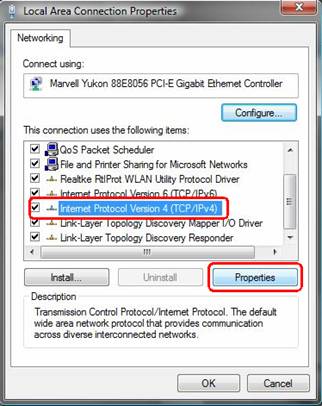
5.Click TCP/IP

6.Click Properties
- Obtain an IP Address automatically
- Use the following IP Address: IP Address, Subnet Mask
7.Click OK
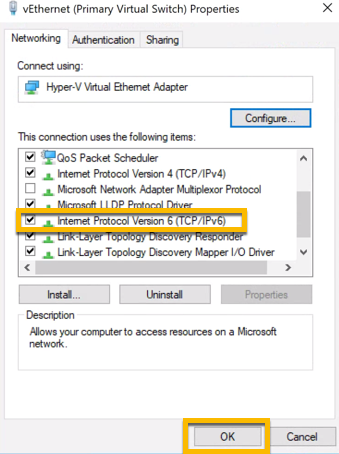
IP Configuration
1. Click Start Button
2. Click Run
3. Type cmd
4. Type ipconfig
5. Type Ping (IPaddress)
Source: https://en.wikipedia.org/wiki/Network_address
https://www.apnic.net/get-ip/faqs/what-is-an-ip-address/
https://searchenterprisewan.techtarget.com/definition/IPv6
https://study-ccna.com/classes-of-ip-addresses/


